






.avif)

Top 10 Features Of Trivantis Lectora Inspire 17 For Responsive eLearning Development

Summary
Discover the top 10 features of Trivantis Lectora Inspire 17 that make responsive eLearning development faster, smoother, and more scalable across devices. This article also shows how custom development can extend standard authoring tool capabilities to create more engaging, branded, and learner-centric digital training experiences.
Today, Trivantis Lectora Inspire 17 is one of the leading authoring tools used for responsive eLearning development. In this article, I pick its top 10 features and show you how you can further enhance its capability with customization.
In contrast to the previous version (Lectora 16), Lectora Inspire 17 power packs the following new aspects:
- Includes enhanced range of 2000+ library assets free from eLearning Brothers, that include Interactions, Layouts, Scenarios, Games and Quizzes, and so on.
- Includes integration of complex branching scenarios through BranchTrack.
- Includes the latest releases of Camtasia® screen recorder for creation and editing of professional quality videos and Snagit® for capturing great-looking images and videos for eLearning courses.
Top 10 Features
The Lectora Inspire 17 offers several significant enhancements over its predecessor and aspects that help its competitive positioning. I pick its top 10 features here.
- One-time design effort and offer it on multiple devicesSince Lectora Inspire 17 features a completely responsive design, you need to design the course once and it will adjust automatically to a device. As models of tablets or smartphones change, you incur no effort to rebuild with Lectora Inspire 17.
- Custom adjustments for perfectionThe tool enables you to make further custom adjustments to see a perfectly adjusted view on target devices.
- Seamless updates to all devices (inheritances)During development, as you update a feature in the desktop, it will be inherited to your tablet. Similarly, any change to the tablet will be inherited to the smartphone. This seamless connection (inheritances) enable you to avoid reworks.
- Legacy course converted to responsive eLearning designWith just 3 clicks, you can convert your legacy (non-responsive) courses to fully responsive eLearning design. Once this is accomplished, you can further fine-tune what you need (device-specific adjustments).
- Seamless PlayThis new feature creates a more engaging user experience as there are smooth transitions within the course. (Some of you may have faced this challenge in Lectora Inspire 16 but this has been fixed in this release.)
- Auto-play media on mobileThis release overcomes a significant challenge in responsive eLearning design that is, syncing voiceover and video content when a page is being accessed on a mobile device. This is a superb feature providing an equally engaging experience on mobile devices that was previously possible only on desktops or laptops.
- Effective control of background audioYou can effectively control background audio across pages (that include, play or pause or stop controls).
- Simple rest to maintain aspect ratio for videosIf the aspect ratio is impacted as you resize the video, this can be rectified easily through the new Reset to Original button option available in the tool. Again, very effective and easy-to-use feature.
- Sharp and scalable rendering of shapes and buttons across devicesWith use of Scalable Vector Graphics (SVG) technology, Lectora Inspire 17 published content will be sharp and crisp on high resolution display devices too.
- Automatic page height adjustmentThis feature enhances the usability and user experience of a responsive eLearning design. In case the content happens to be too low on the page (on a mobile device), the tool will automatically bring in a vertical scrolling option. This ensures that no content is lost.
What More Can Be Achieved With Lectora Inspire 17?
While my top 10 list shows the key features of Lectora Inspire 17 that can help you create fabulous responsive eLearning design, however, there is more that can be achieved through customization.
At EI Design, we have been enhancing the learning experience through our capability to customize certain templates that can meet the needs to create specific learning experiences.
Here are 6 features for Lectora Inspire 17 that have been customized by us (that is, these are not available by default):
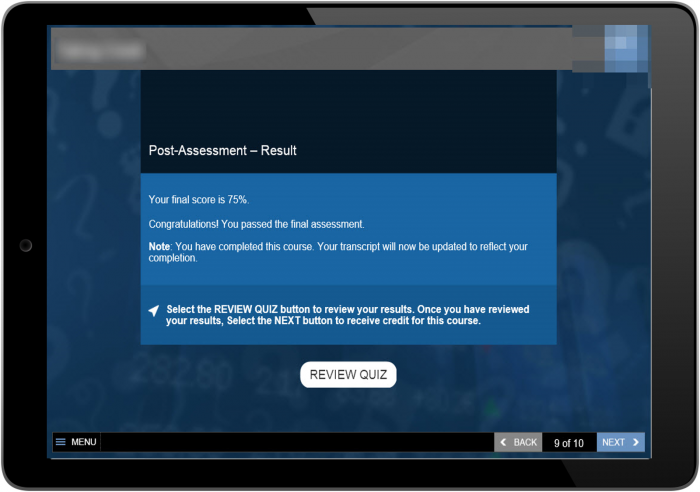
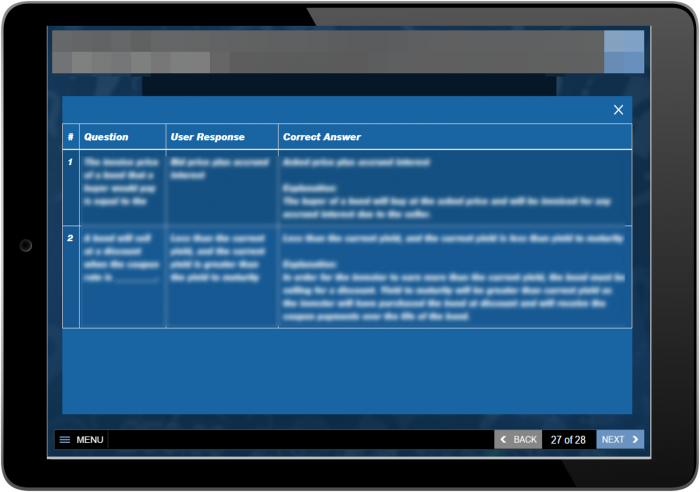
1. Custom Review Quiz Function
What does the standard feature offer: The default quiz results page shows the results question by question in a single column.
Our value-add: We have created JavaScript function to track all user responses and with the help of JSON we can now display the results in a tabular format. This approach provides a much better view of the results.
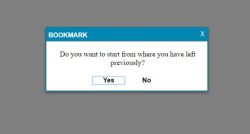
2. Custom Resume Function
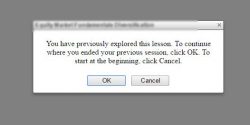
What does the standard feature offer: The standard resume popup comes with a default text and skin.
Our value-add: We have customized the skinning for Lectora Inspire 17 resume popup to match with customer-specific design standards. This custom feature allows us to customize the popup in line with the course skin/theme.
Default
Custom
3. Custom Dropdown Menu With Forced Navigation
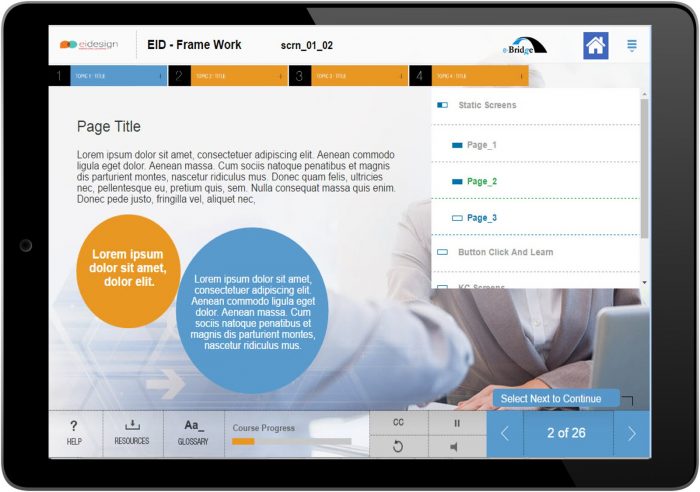
What does the standard feature offer: The default menu available on Lectora Inspire 17 allows the user to select the menu items in any order.
Our value-add: We have created the custom dropdown menu with features that give higher control like:
- Flexibility: Force/Free navigation
- Status: Show Progress and Visited states of individual pages and topics
- Customization: Easily change the menu design
- User-friendly cues: Can offer topic-level grouping of menu items
- Created more than 10 different menu styles
Using this custom feature, we can have custom control over menu and inline branding with the course skin/theme.
4. Custom Transcript
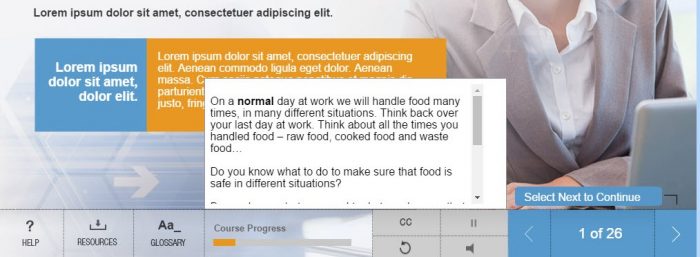
What does the standard feature offer: There is closed captions for inline videos and audio files.
Our value-add: We have created custom transcript panel for screen background audio files, which import the text from XML. This allows us to:
- Easily update the text (without having to republish)
- File sizes are lesser
- Better loading time
5. Custom Audio Play/Pause
What does the standard feature offer: In Lectora, we have controls for audio files individually. (If an eLearning course has 5 audio files in different pages, we need to provide controls for all the 5 pages.)
Our value-add: We have created custom audio play/pause which can control all the audios files. With this, there is no need to keep these buttons in individual pages.
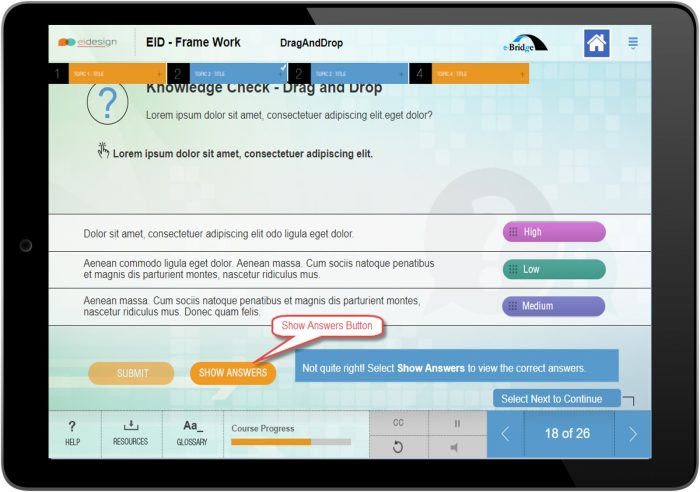
6. Custom Drag and Drop
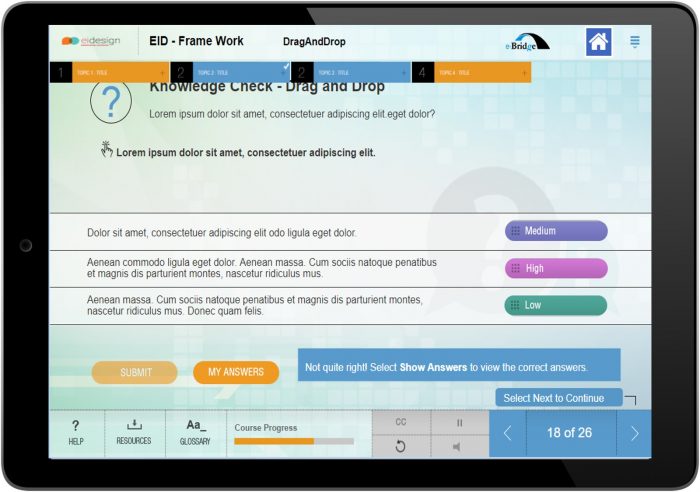
What does the standard feature offer: The default feature of drag and drop question available in Lectora Inspire 2017 provides feedback upon submitting. However, there is no option to determine which options are correct and which options are incorrect.
Our value-add: We have enhanced the functionality by adding the features shown here. These changes are implemented in the Lectora backend files.
- Try Again: It will reset the options. (In the default mode, the options do not reset.)
- Show Answers: User can see the correct answers after the last attempt.
- My Answers: User can see their answers and compare with the correct answers.
Summary
I hope this article provides a good overview of the key features of Lectora Inspire 17. More significantly, hope you can see how you can push its standard capabilities further to achieve highly customized learning experience.
At EI Design, our Lectora expertise is nearly a decade old and we can help you achieve this and more. Do contact me at apandey@eidesign.net, if you have any queries or need a specific support.
Need More?
Want more insights on how you can use Trivantis Lectora Inspire 17 to enhance the impact of your corporate training? Schedule a call with our Solutions Architecting Team.
Read More

subscribing!
Related articles


.jpg)
.jpg)





.jpg)
