






.avif)

Featuring Interactive PDF as a Learning Aid To Supplement eLearning

Summary
Interactive PDFs turn dense, text-heavy information into structured, visually engaging learning aids that are easier to navigate and apply. Used alongside eLearning, they help organizations improve performance support, enable faster access to critical information, and make learning more practical in the flow of work.
In this article, I will share our experience of using Interactive pdf format to convert lengthy information (often boring information) into an effective learning aid that has an attractive visual format and is easy to navigate.
Performance Support: Featuring Interactive PDF as a Learning Aid To Supplement eLearning
As an organization focusing on online learning solutions for over 15 years, our focus had primarily been on the online/blended training design and delivery.
In early 2013, we began Knowledge Audit of our customers’ intranet databases to ascertain the job aids that could support training initiatives being designed and developed by us.
During the course of the year, we extended our Knowledge Audit services to convert existing information into formats that would:
- Make the information learner friendly
- Make the learning sticky
In this article, I will share our experience of using Interactive pdf format to convert lengthy information (often boring information) into an effective learning aid that has an attractive visual format and is easy to navigate.
Additionally, you can add other supporting elements in the same document that step up its value further. These include:
- Interactive demos
- Application simulations
- Webcasts
Case study: The Power and Impact of Using Interactive-PDF
Let me showcase the power and impact of using Interactive pdf through a Case study. (Most of you would relate to it as we often have “useful” but lengthy information that we need our learners to read with interest, internalize and apply..)
We recently launched a suite of 15 online, mobile enabled modules for Instructional Designers. Since this was our first foray into creating products (we have been a services company so far), I had created a detailed presentation that covered following key aspects:
Section 1: Provides an overview of through the following:
- What is the ProductLine InSight all about
- Who does it cater to
- How is it different
- How will it help learners
Section 2: For each module, I had captured the following details:
- Learning mandate
- Instructional strategy
- Solution
- Outcomes
- Screenshots
Challenge
Before I knew it, the deck had 86 slides and while information was meaningful, there was no way I was going to be able to get my prospects to read all of this and confirm orders! To add to this, there was a series of demos that the recipient would need to go through separately.
This is what the first deck looked like.

Update
We first enhanced the visual punch of the document. This certainly improved the “engagement factor” but my deck still had a tedious, linear navigation (over 85 slides).
This is what the same frame looked like in the second deck.

Solution
We then looked at Interactive pdf format to present the mammoth 86 slides worth of information
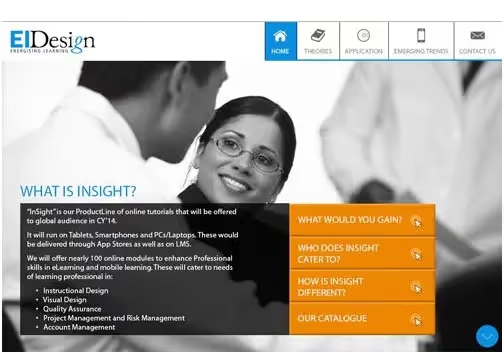
- At the Home page, we were able to get the entire Section 1 and 2 (through interactive sub-sections).
- Additionally, we now had the Interactive Demos alongside the description of each module.
Outcomes
Success finally! The linear 85 clicks changed to much shorter steps and gave each recipient the dynamic control they sought:
- Over 4 clicks, the recipient would get a complete perspective of the initiative.
- On 5th click, they can move on to the description of each module and assess its strength.
- On 6th click they can preview the demo to validate.
- On 7th click, they can contact us.
This is what the Interactive pdf home page looks like.

What more is possible with Interactive PDFs?
- Potential useful for varied segments
We have used Interactive pdfs as effective learning aids successfully for our customers in Banking, Finance and Insurance sectors extensively. - Fits in for most information types
The initial buy-in is to convert Policies, Procedures, Guidelines (and other lengthy documents). - Can add significant value in instances like:
- We have used it to create Online Help documents.
- We have brought in visual punch and done intuitive, easy-to-use content layering and integrated other assets (like webinars, videos and supporting information) in creating interesting supplements to Induction programs.
I hope this will provide pointers to all those who are looking at innovative ways to enhance performance support to learning. Last but not least, here is the url to the Interactive PDF.
Read More:
- Performance Support Tools – Tips And Strategies To Boost Employee Performance
- What Is Performance Support And Why Should You Use Performance Support Tools?
- 3 Examples On How Performance Support Tools Can Supplement Compliance Courses
- How To Boost Your Workforce Performance With Interactive PDFs And eBooks

subscribing!
Related articles


.jpg)
.jpg)





.jpg)
