






.avif)

SCORM-Compliant LMS Explained: Delivering Measurable, Scalable, and Consistent Learning

Summary
Navigate SCORM LMS compatibility. Ensure interoperability, scalable training, and smooth content management. Choose the right SCORM LMS today!
HR and Learning teams are under pressure to do more than just train employees; they must enable growth, accelerate performance, and prove the ROI of every learning initiative.
Yet, one persistent challenge remains: ensuring that training content works seamlessly across systems, scales with business needs, and delivers measurable outcomes.
That’s where SCORM, the Sharable Content Object Reference Model, quietly holds everything together. It’s the invisible thread that ensures your learning content runs smoothly across platforms, tracks learner progress, and delivers consistent results, no matter the LMS.
Despite being around for two decades, SCORM is far from outdated. The market for SCORM-compliant LMS software already stood at US $101 billion in 2023, with a projected CAGR of 11% through 2030.
In this article, we'll understand what SCORM means, how it works, and how your organization can benefit from it.
TL;DR: Key Takeaways
- SCORM keeps your learning connected: It ensures your content runs smoothly across LMSs without compatibility issues.
- It’s the language of eLearning: SCORM defines how your content communicates with your LMS, tracking progress, completion, and performance.
- Still relevant, still reliable: Despite newer standards, SCORM remains widely used for its stability and cross-platform consistency.
- SCORM-compliant LMS = scalability: It lets you distribute, measure, and manage content across large, diverse learner groups.
- Future-ready foundation: SCORM sets the groundwork for adopting advanced standards like xAPI and cmi5 later.
What SCORM Means and Why It Still Matters
At its core, SCORM (Sharable Content Object Reference Model) is a technical framework, but its value extends beyond technology. It’s what allows learning teams to build content once and deploy it anywhere.
Think of SCORM as the “common language” between your eLearning content and your Learning Management System (LMS). It tells the LMS what to do, track progress, record scores, bookmark learner progress, and confirm completion, without needing custom coding or platform-specific tweaks.
So instead of worrying whether your content will work across systems, SCORM ensures it just does. Even with new standards like xAPI and cmi5 on the rise, SCORM continues to dominate corporate learning because of three key advantages:
- Interoperability: Create content once, use it across multiple LMSs.
- Data tracking: Monitor learner engagement and results with reliable consistency.
- Longevity: It’s a mature, proven standard supported by nearly every LMS in the market.
For most organizations, especially those managing large-scale learning portfolios, SCORM remains the foundation of a scalable, trackable, and seamless learning ecosystem.
Let's explore how SCORM actually works, the mechanics that make your LMS “talk” to your learning content.
How SCORM Works
If SCORM were a language, your LMS and learning content would be two people having a perfectly synchronized conversation, exchanging progress, scores, and completion data in real time.
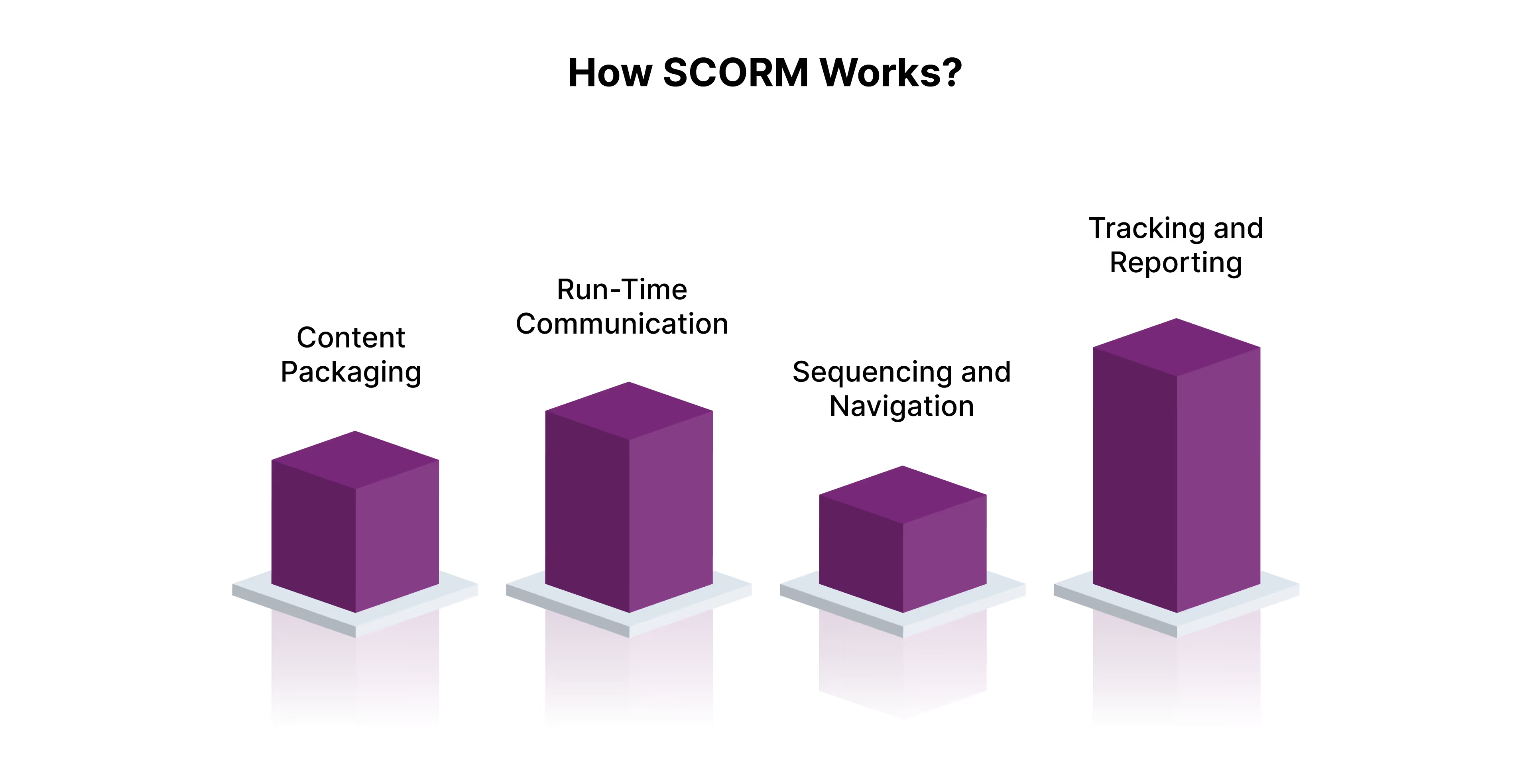
Here’s how that conversation happens.
1. Content Packaging
Every SCORM course is packaged as a single ZIP file, known as a SCORM package. Inside, it contains all the elements an LMS needs to understand and launch the course: text, media, quizzes, and one crucial file called imsmanifest.xml.
That manifest file is the course’s roadmap. It tells the LMS:
- What files to open
- How the modules are structured
- What the learner’s journey looks like
This standardization ensures that no matter which LMS you upload the package to, it always “knows” how to read it.
2. Run-Time Communication
Once a learner launches the course, SCORM enables a two-way data exchange between the LMS and the content, called run-time communication.
Here’s what that looks like in practice:
- The content “asks” the LMS for the learner’s name or previous progress.
- The LMS “responds” with the stored data.
- As the learner moves through the course, SCORM “sends” back results, quiz scores, completion status, time spent, and more.
This process makes it possible for the LMS to track progress automatically and generate reports with zero manual effort.
3. Sequencing and Navigation
SCORM also controls how learners move through the content. It defines what happens next, whether learners must complete Module 1 before unlocking Module 2, or whether they can skip ahead based on performance.
This structure, called sequencing, ensures a logical, consistent learning journey that aligns with your instructional design.
4. Tracking and Reporting
SCORM allows LMSs to capture and report critical learning data points such as:
- Completion status (completed, incomplete, not attempted)
- Success status (passed, failed)
- Scores and mastery levels
- Time spent on each activity
- Learner interactions (answers, choices, attempts)
For Learning and Development teams, this data is gold. It enables you to measure effectiveness, identify skill gaps, and optimize future learning design, all from a single dashboard.
It is also important to understand what makes a platform “SCORM-compliant” and how to choose the right LMS that supports it.
What Is a SCORM-Compliant LMS (and Why It Matters)
A SCORM-compliant LMS is a learning management system that supports the SCORM standard, the global benchmark that allows your eLearning content to be imported, launched, tracked, and reported seamlessly across different platforms.
When you build a course using SCORM-compliant authoring tools such as Articulate Storyline, Adobe Captivate, or iSpring, it generates a ZIP package that includes all learning content and tracking data.
If your LMS is also SCORM-compliant, it can:
- Instantly recognize and launch the course package
- Avoid reformatting or compatibility issues
- Automatically track learner progress, completions, and scores
This matters most for organizations that manage complex learning ecosystems — for instance, when:
- Migrating from one LMS to another
- Working with external training vendors
- Scaling learning programs globally
In short, a SCORM-compliant LMS acts as a bridge between your content and your learners. It ensures every course runs smoothly, every interaction is tracked accurately, and every insight is measurable.
How to Choose the Right SCORM-Compliant LMS
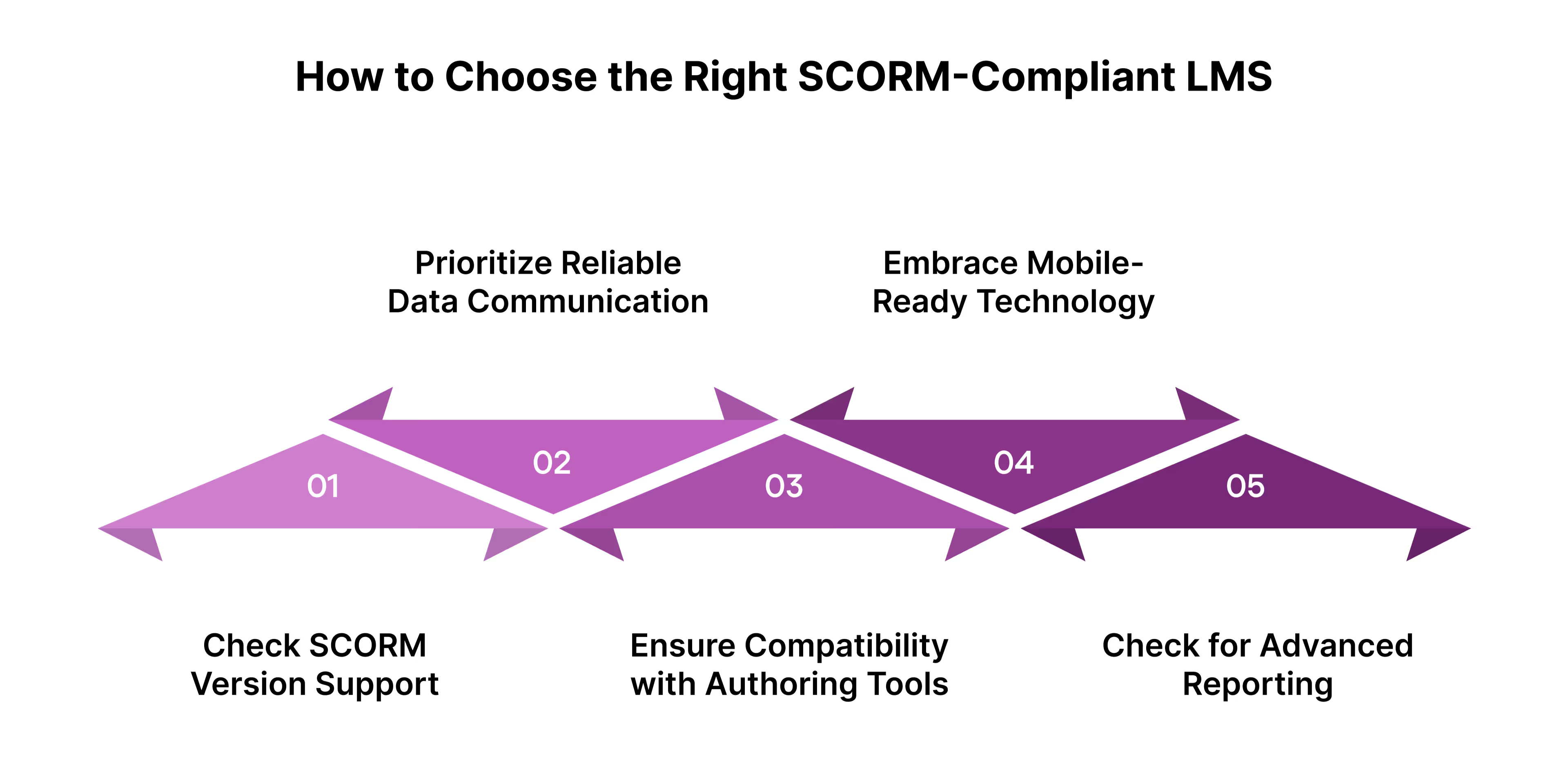
Not all SCORM-compliant platforms are built the same. Here’s what to evaluate before selecting one for your learning ecosystem:
1. Check SCORM Version Support
SCORM has evolved over time, with multiple versions available:
- SCORM 1.2 – the most widely supported version across LMSs and authoring tools.
- SCORM 2004 – an enhanced version that adds adaptive sequencing and more detailed tracking.
- xAPI (Tin Can API) – the next-generation standard that tracks learning beyond the LMS (e.g., workshops, simulations, mobile learning).
For broader compatibility with existing content, choose SCORM 1.2. For flexibility and future-proofing, opt for SCORM 2004 or xAPI.
2. Prioritize Reliable Data Communication
The LMS should support core SCORM tracking data like:
- Completion and success status
- Time spent on each module
- Scores and performance data
- Learner interactions and progress bookmarks
Accurate data capture ensures you can measure training effectiveness and link learning outcomes to business KPIs.
3. Ensure Compatibility with Authoring Tools
The LMS must integrate smoothly with the tools you already use to create SCORM courses. Look for platforms that support easy content uploads, auto-recognition of SCORM packages, and bulk import options.
4. Look for Modern, Mobile-Ready Technology
Select an LMS that utilizes HTML5 instead of outdated technologies like Flash. This ensures SCORM courses run on all browsers, devices, and operating systems, essential for today’s hybrid and mobile-first workforce.
5. Check for Advanced Reporting
A good SCORM-compliant LMS consolidates learner data into insightful dashboards, helping you track completions, scores, and time spent, without needing manual analysis.
Next, let’s explore how to create and deliver SCORM-based eLearning content that drives engagement and measurable outcomes.
How to Create and Deliver SCORM-Based eLearning Content
Creating SCORM-based eLearning content isn’t just about packaging courses in a standard format; it’s about ensuring your learning experiences are trackable, portable, and performance-driven across any LMS.
Here’s a clear step-by-step breakdown to help you design, publish, and distribute SCORM-compliant content effectively.
1. Choose a SCORM-Compliant Authoring Tool
Start with a robust authoring environment that supports SCORM export.. Tools like Articulate Storyline, Adobe Captivate, Lectora, and iSpring Suite allow you to create interactive, media-rich courses and export them directly in SCORM format.
When choosing your authoring tool, ensure it:
- Supports both SCORM 1.2 and SCORM 2004 versions
- Enables interactive elements (quizzes, simulations, branching scenarios)
- Allows you to define completion and scoring rules
- Publishes to HTML5 for mobile compatibility
Tip: If your organization uses PowerPoint extensively, tools like iSpring make it easy to convert existing decks into SCORM-ready courses, saving time and resources.
2. Structure and Package the Content
Once your course is ready, it needs to be bundled into a SCORM package, a ZIP file containing:
- The imsmanifest.xml file (the course’s “map”)
- All supporting assets (media, text, assessments, and scripts)
- Metadata defining the SCORM version and course details
This standardized package ensures your content can be uploaded and read by any SCORM-compliant LMS without formatting issues.
3. Define Learning Paths and Tracking Rules
Before publishing, set your SCORM course parameters. This determines how the LMS tracks and reports learner activity.
Common settings include:
- Completion criteria (e.g., 100% content viewed or 80% quiz score)
- Navigation rules (e.g., enforce module sequence or free navigation)
- Bookmarking (so learners can resume from where they left off)
- Assessment tracking (to record scores and attempts)
These configurations ensure consistency in how progress and success are measured across your LMS.
4. Upload and Test on the LMS
After publishing, upload the SCORM ZIP file to your LMS. Once uploaded, always test the course to confirm:
- It launches correctly across devices and browsers
- Tracking data (scores, completion, time) appears accurately in reports
- Navigation and interactions function as intended
You can also use SCORM Cloud, a free testing environment by Rustici Software, to validate your package before deploying it organization-wide.
5. Distribute and Track Performance
Once tested, assign the course to your learners. Your LMS will automatically track metrics like:
- Who started and completed the course
- Time spent per session
- Scores achieved on assessments
- Points of learner drop-off
These insights enable you to identify performance gaps, optimize learning design, and continually improve training effectiveness.
Let’s explore how SCORM versions compare to each other.
Understanding the Differences Between SCORM Versions
While AICC, SCORM 1.2, and SCORM 2004 all standardize how digital learning content communicates with LMSs, their functionality and tracking depth vary significantly. Understanding these differences helps you choose the right format for your learning ecosystem.
AICC (Aviation Industry CBT Committee)
AICC was the earliest eLearning standard and laid the groundwork for SCORM. It uses HTTP-based communication, meaning courses can be hosted on a different server from the LMS, a key advantage for organizations licensing third-party content libraries.
This structure allows vendors to store content on their own servers and share lightweight “stub” files with clients. Learners access the content through the LMS, while tracking and reporting still occur seamlessly in the background.
Ideal for:
Organizations using off-the-shelf content libraries or distributed learning environments.
SCORM 1.2
Introduced in the early 2000s, SCORM 1.2 remains one of the most widely adopted standards in corporate learning.
Its primary strength lies in universal compatibility, ensuring eLearning content can be deployed across virtually any LMS.
It supports basic tracking data such as:
- Course completion status
- Time spent within modules
- Quiz scores and learner progress
However, SCORM 1.2 has limitations in sequencing, advanced data capture, and detailed learner analytics.
Ideal for: organizations prioritizing broad compatibility and simplicity over advanced analytics.
SCORM 2004 (3rd Edition)
SCORM 2004 builds on the earlier version with major improvements in tracking, navigation, and reporting flexibility.
The most significant addition is sequencing and navigation rules, which let instructional designers control how learners move through the course.
For example, you can:
- Require course completion before taking a quiz
- Send learners back to specific content when they miss a question
- Create adaptive learning paths based on learner performance
SCORM 2004 also introduces two important tracking refinements:
- Completion status (complete/incomplete) and success status (passed/failed) are now reported separately for greater accuracy.
- Detailed quiz-level reporting allows tracking of questions, answers selected, and overall interaction data.
Ideal for: organizations that need richer learner analytics and more control over adaptive learning flows.
Benefits of Using SCORM in Your Learning Ecosystem
With its structure, reliability, and scalability, SCORM remains the foundation of modern digital learning, even as new standards emerge.
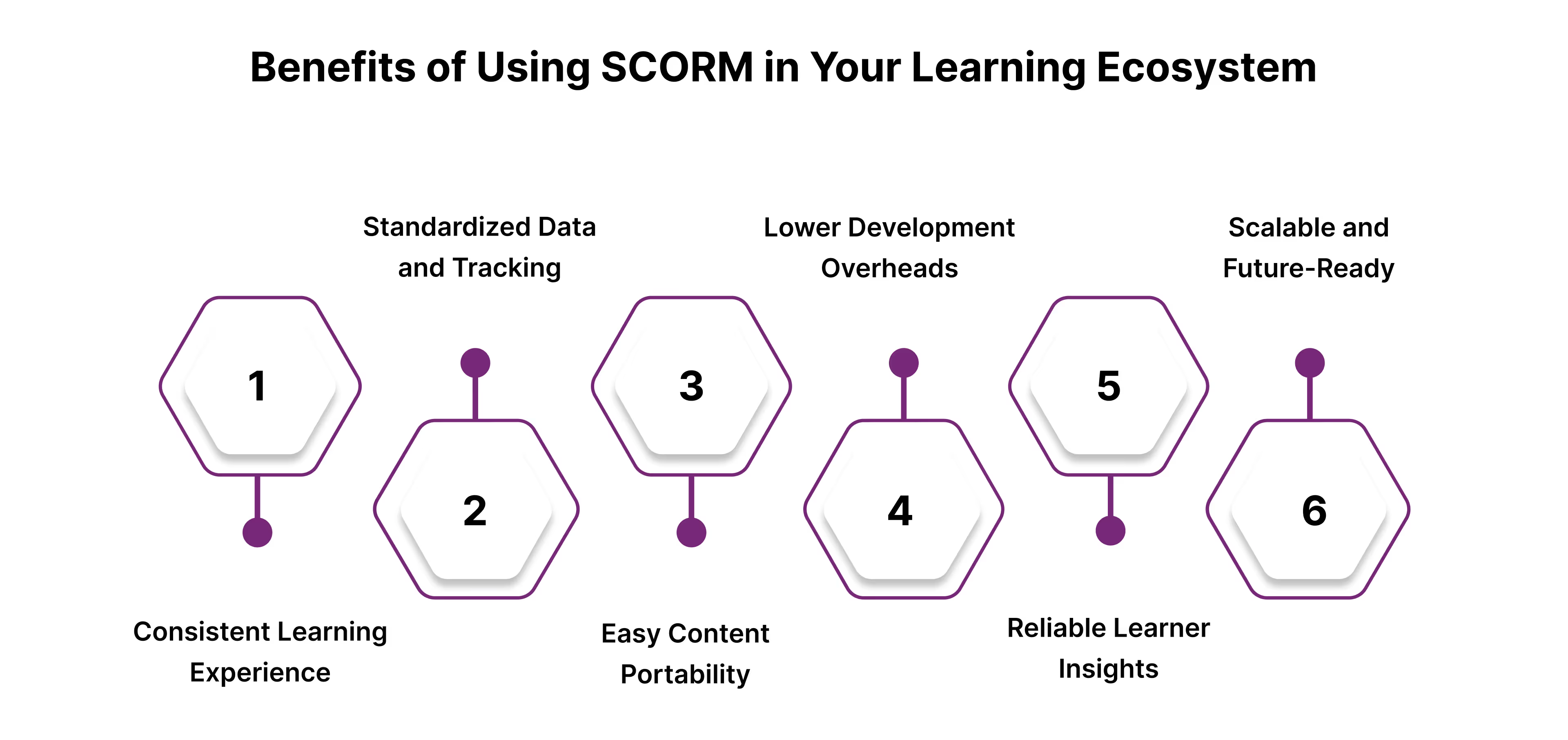
Here’s why it still adds real value:
1. Consistent Learning Experience Across Platforms
SCORM ensures that your eLearning content runs smoothly on any compliant LMS, regardless of vendor or environment.
This interoperability eliminates compatibility issues, allowing you to create once and deploy anywhere, saving both time and cost.
2. Standardized Data and Tracking
With SCORM, every course follows a consistent data model. You can track completion rates, scores, time spent, and learner progress across all modules, creating a unified view of learning effectiveness throughout the organization.
This standardization also simplifies compliance audits and performance reporting.
3. Easy Content Portability
As business needs evolve, you may migrate between LMS platforms or merge systems after acquisitions.
Because SCORM courses are packaged in a universal format, they can be easily exported, imported, and reused without redevelopment. It’s a future-proof way to protect your learning investments.
4. Lower Development Overheads
SCORM-based authoring tools like Articulate, Captivate, and iSpring allow Learning and Development teams to build interactive content without coding.
This reduces development timelines and empowers internal teams to iterate quickly, a key advantage in agile learning environments.
5. Reliable Learner Insights
SCORM enables Learning and Development teams to go beyond completion tracking and measure learner engagement and mastery.
With SCORM 2004, detailed analytics on learner choices, time per screen, and question-level data help uncover learning gaps and opportunities for improvement.
6. Scalable and Future-Ready
SCORM has stood the test of time. Its widespread adoption ensures that your learning content will remain compatible with new systems for years to come, making it a safe and scalable choice for enterprise-level Learning and Development.
Transform Your SCORM and LMS Strategy with Liberate Global
Building SCORM-compliant courses or choosing an LMS isn’t the end goal; creating a connected, performance-driven learning ecosystem is.
At Liberate Global, we help organizations bridge the gap between technology and learning impact. Our team works with you to:
- Modernize legacy training into SCORM, xAPI, or cmi5 formats for seamless LMS integration.
- Design engaging learning journeys that go beyond compliance, driving retention, confidence, and real-world application.
- Optimize LMS implementation so your content, data, and analytics work together to deliver measurable results.
- Enable continuous learning with microlearning, performance support, and learning-in-the-flow tools.
We don’t just make your courses SCORM-ready; we make them strategy-ready.
Conclusion
SCORM remains the backbone of modern eLearning, enabling consistency, compatibility, and data-driven insights across platforms.
But true learning transformation doesn’t happen just by being SCORM-compliant. It happens when your content, LMS, and learning strategy come together to drive performance, engagement, and growth.
At Liberate Global, we help organizations move beyond the technical side of SCORM to unlock the business value behind it, designing adaptive, measurable, and future-ready learning ecosystems that work across systems and learners. Connect with Liberate Global’s consulting team today
FAQs
1. What does it mean for an LMS to be SCORM-compliant?
A SCORM-compliant LMS can import, launch, and track SCORM-based courses seamlessly. It ensures that learning data like scores, completion rates, and time spent are accurately captured and reported.
2. What version of SCORM should I use: 1.2 or 2004?
SCORM 1.2 is still widely supported and ideal for simple course tracking, while SCORM 2004 offers advanced sequencing, detailed reporting, and better learner navigation control. Your choice depends on your training goals and LMS capabilities.
3. Can I convert my existing learning content to SCORM format?
Yes. At Liberate Global, we specialize in content modernization, helping organizations convert legacy Flash, PPT, or video-based content into fully SCORM- or xAPI-compliant modules that integrate seamlessly with your LMS.
4. What’s the difference between SCORM and xAPI?
While SCORM tracks learning activities within the LMS, xAPI expands this by capturing learning that happens outside traditional platforms, such as mobile learning, simulations, or real-world activities.
5. How does Liberate Global help optimize SCORM-based learning?
Liberate Global EI helps organizations design, modernize, and integrate SCORM content that not only works technically but performs strategically, aligning learning outcomes with business goals and delivering measurable results across the learner journey.

subscribing!
Related articles


.jpg)
.jpg)






.jpg)
