






.avif)

Strategies to Enhance the Impact of Storytelling in eLearning – Featuring 3 Examples


Though less used, storytelling in eLearning can create powerful, engaging experiences - leading to sticky learning. In this article, I outline how microlearning, gamification, scenarios, and branching simulations can help you unleash its power.
Why Is Storytelling in eLearning a Great Fit for Training in the New Learning Environment?
Learner engagement is a key element of any eLearning program.
With so many employees now working remotely - facing diverging work and personal priorities, getting them engaged in eLearning is often a challenge.
Although less frequently used, storytelling in eLearning is a great fit for training in this new learning paradigm. Storytelling as an eLearning tool, especially if the plot is workplace-based, helps learners relate to the content.
- Given that a significant part of the workforce works remotely today, a well laid out storyline also helps learners connect with the various virtual characters (Manager, Supervisor, Boss, Subordinate) and roles (Sales, Tech Support, Customer Service) within their organization.
- More importantly, given the new reality of remote work, trainers can use strategically designed story based learning to train learners on both real-life and hypothetical situations that many of them (employees) are likely to encounter when (eventually) they do return to in-person work.
How Does Story Based Learning Connect with Learners Emotionally and Help Drive Behavior Change?
Conventional narrative based training typically walks learners through content – such as compliance standards, policies and procedures, and safety regulations – with a view to make learners aware of what’s right and what’s not.
However, this a rather impersonal approach to training. In contrast, the use of storytelling in eLearning employs a different approach.
- It encourages virtual learners to “live” what they are learning, thus creating a sense of participation with the curriculum.
- By weaving a story into learning content, trainers build an emotional attachment between learners and characters (protagonists, antagonists, main characters, supporting characters).
- Once that emotional attachment is built between characters in the story – for instance between a Supervisor and a new inductee to the team – it’s easier to encourage behavioral change through story based learning.
For instance, reading a 10-page PowerPoint presentation on “Why you shouldn’t leave the machine powered on overnight” won’t have as much impact on behavior modification as a story based approach: “Meet Bob…who is on disability leave because a colleague left the machine plugged in overnight causing Bob’s injury the next morning.” If the storytelling exercise forces the learner to see the workplace through Bob’s eyes, he/she is more likely to empathize (and even sympathize) with Bob’s situation.
Empathy is an emotion that leads to behavioral change – and that’s the power that storytelling wields!
Storytelling in eLearning – 4 Strategies to Further Enhance Its Impact
Here are four strategies to employ when using storytelling in eLearning:
1. Microlearning: Today’s workplace is typified by employees wearing multiple hats, multitasking, and working on the go. With little time to get lots done, microlearning – bite-sized content – is a great storytelling aid.
Use case: Instead of using multiple slides or pages of content to introduce plots and key characters, use brief snippets of micro content to do so. Save time and keep learners engaged.
2. Gamification: The use of games for storytelling in eLearning plays on the key theme of making learning fun and interesting for remote learners. At the same time, it also plays upon the learners’ emotions and sense of curiosity to delve deeper into an unfolding game based story.
Use case: Use milestone unlocks, as part of your game design, to encourage eLearners to complete a segment of the learning program and move to the next phase (chapter) of the story’s plot. Building clues and breadcrumbs in the game can also help virtual learners unfurl learning plots to move the storyline (curriculum) forward.
3. Scenario based learning: Using story based learning to build your stories around real-life workplace scenarios helps in several ways. Firstly, it’ll help virtual learners relate to the plot or the key characters. Relating often fosters retention. More importantly, by introducing multiple versions of a scenario, trainers can help learners build skills to handle variants of a resolution.
Use case: Use different workplace situations (scenarios) to train learners on how to think on their feet and how to use critical thinking to resolve the situation. For instance, in one scenario, Bob (a Manager) must tell Jack (an IT tech) that he’s being let go. In another scenario, Jack comes in with his resignation, and Bob must try to convince him to stay on. How will the story end? What will the resolution be in each case? In this way, you can offer learners real-life scenarios to help them improve their critical thinking at the workplace.
4. Branching simulations: When it comes to using storytelling as part of an eLearning experience, branching simulations are a great tool to encourage learners to practice decision-making virtually. It also emboldens eLearners to make alternative decisions, influence the outcome of a story, and weigh the consequences of those alternate actions in a safe environment.
Use case: As part of a storyline, which narrates how a Technical Support assistant uses product knowledge to diagnose and fix an issue, branching simulations may work well to train learners on troubleshooting and resolution skills. The learner must make a decision whether the issue is hardware or software-related. If it’s a software issue, the story based learning script may lead him/her down a separate branch: Operating software? Firmware? Application? Determining it’s a hardware issue might lead the learner down a branch that troubleshoots using a different script: Power? Display? Unusual sounds?
Let me share 3 examples – across different corporate training needs that illustrate how you can uplift the engagement quotient and impact of the content through story based learning.
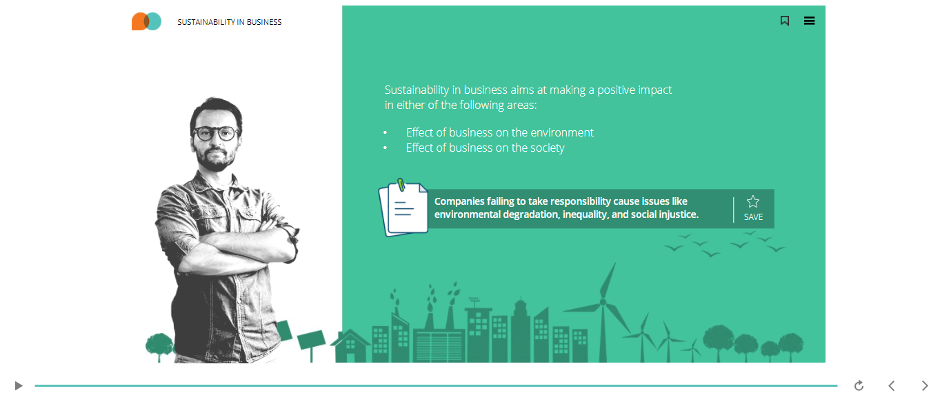
Example 1 – Course on Sustainability in Business
This is an example of a Storyline 360 course using modern UI that features a storytelling approach along with scenario based learning.
- The objective of this course is to make employees aware of the importance of having a sustainable business strategy that takes care of the environment, basic human rights, and how individuals can take collective responsibility to ensure a balanced ecosystem.
- The course showcases a story of 4 characters who have gone through challenges with respect to the concept of sustainability and how they’ve handled a specific focus area. They take the learner through various case studies, recommendations, and activities that reflect their experiences so that the learners understand the different aspects of sustainability in business.
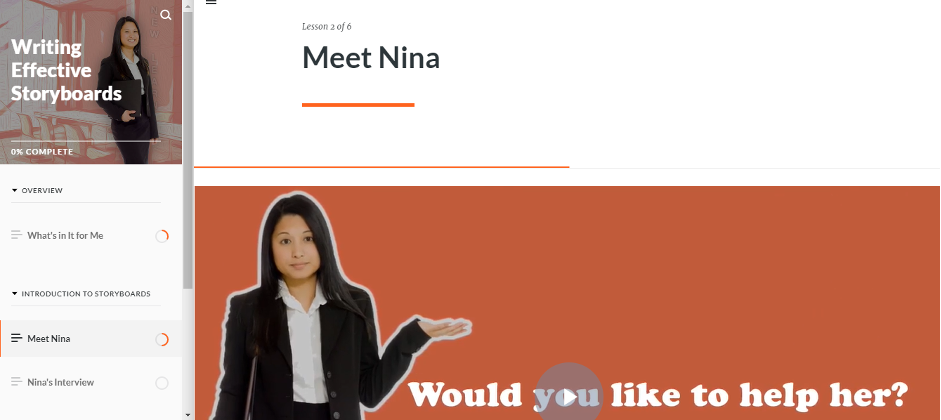
Example 2 – Course on Writing Effective Storyboards
This is an example of a mobile-first course, which uses the narrative of a character called “Nina” who is an Instructional Designer. The entire course follows her journey, and in the process, learners pick up the required skills to create effective storyboards.
- In this story, she first prepares for an interview for the position of Instructional Designer, attends the interview, and starts working in the company after getting selected.
- A common thread is used to drive the learning across the module – Nina’s journey, which is very relatable to the intended audience. In the process, the learner understands what storyboards are and various tips and best practices to create effective storyboards.
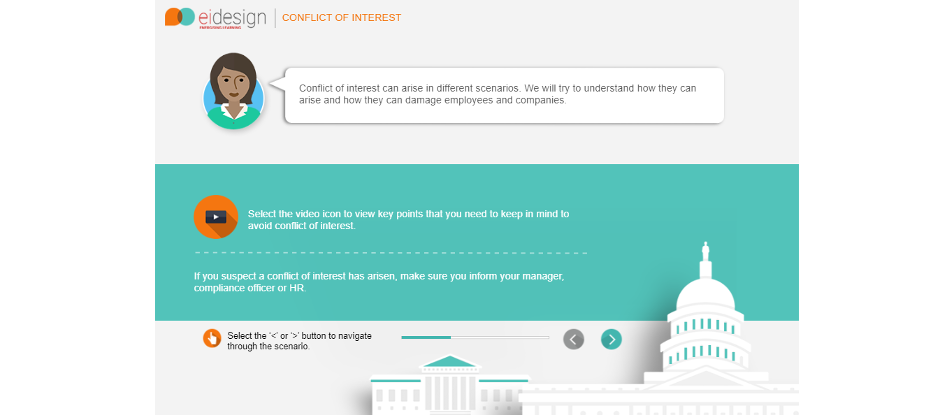
Example 3 – Course on Conflict of Interest
This is an example of a story based learning approach where the learner becomes a part of the story. Then, he/she interacts with two characters and answers their questions related to the topics presented.
- In the process, the learner is the expert that the other cast of characters reach out to.
- To meet this mandate, the learner gets to learn and aid the other characters by applying their understanding.
Parting Thoughts
With so many employees working and learning remotely, embracing a less-used story based approach to eLearning helps in two ways.
- Firstly, it engages learners on an emotional level, using stories to connect them to the learning content.
- More importantly, storytelling in eLearning helps predicate behavior changes in employees by helping learners relate with the desired behavior modeled by characters in the story.
I hope this article provides the requisite insights on how you can make use of storytelling approaches to engage learners and create sticky learning experiences.
Meanwhile, if you have any specific queries, do contact me.
Read More
- eBook: Elevating Remote Learning Programs Trilogy
- Training the Modern Learner – Delivery Strategies and Content Formats that Work
- Change Employee Behavior in the Workplace with These 5 High-impact Corporate Training Strategies
- How You Can Use Storytelling In Corporate Training: Featuring 5 Effective Examples
- 2 Great Story-Based Learning Examples to Create Engaging eLearning

subscribing!
Related articles


.jpg)
.jpg)






.jpg)
